
One workspace for AI, projects, teams, and real work
TeamUp helps users organise projects, work with AI, collaborate with teammates, attach files for context, and keep work moving in one clean workspace.
TeamUp is an AI workspace product by ai4work, built to help people and teams organise AI-powered work in one connected place.
TeamUp brings together AI chat, projects, folders, file-backed context, team collaboration, messaging, BYOK model access, and AI Assistants. It helps users manage the context behind their work — including chats, files, instructions, shared knowledge, and team conversations — so AI interactions become easier to continue, reuse, and build on over time.
TeamUp is a digital-native software product available through the web. Users can access the app online, connect supported AI providers with their own API keys, and use workspace features to manage projects, chats, files, teams, and Assistants.
TeamUp is live in beta with practical core workflows ready to use today. Built-in feedback through Pulse lets users report issues, suggest improvements, and help shape what comes next — directly from inside the workspace.
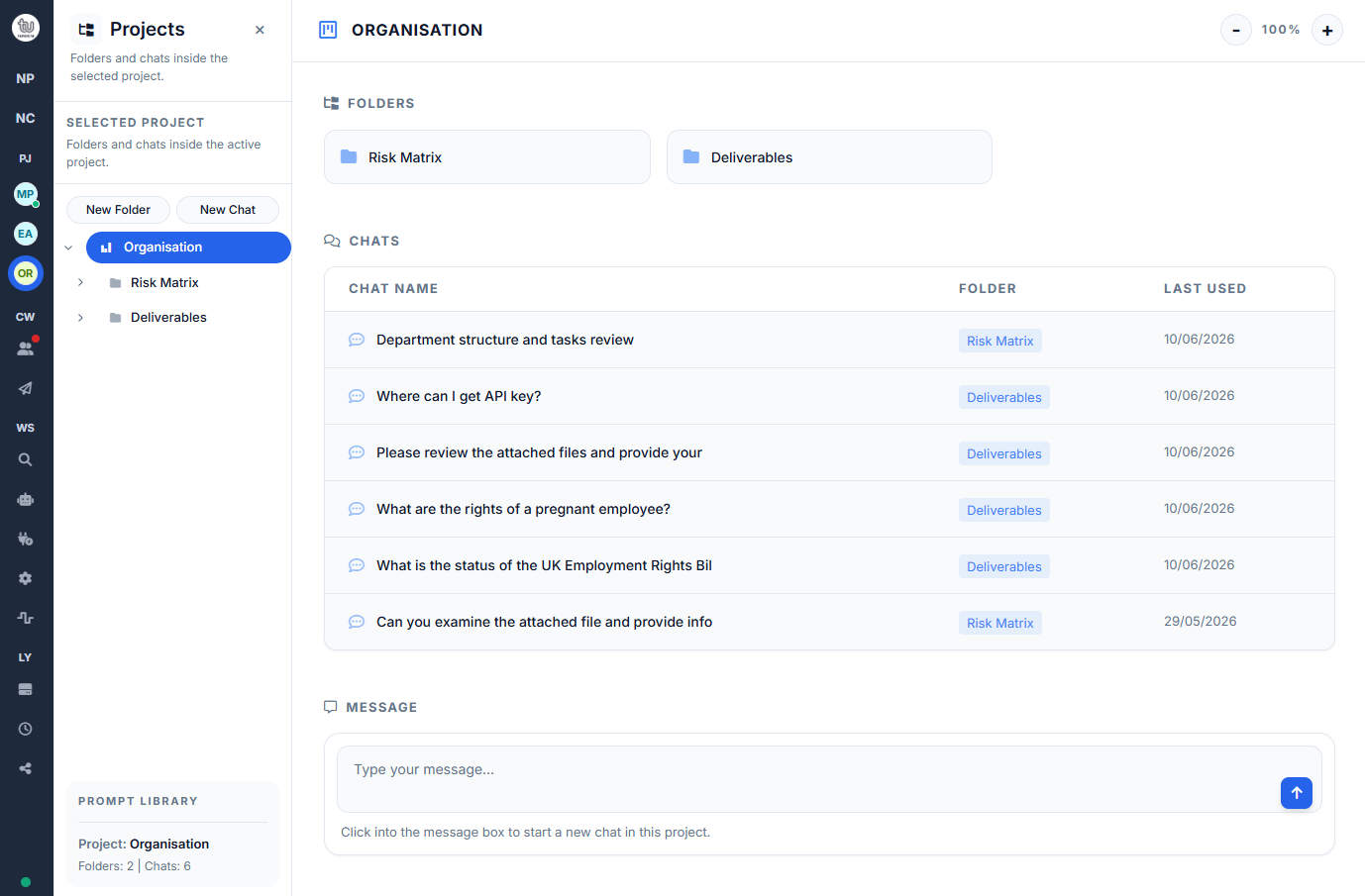
Projects and folders that keep work structured
AI chat with flexible model choice
Shared team spaces for collaboration
Direct and team messaging in the same workspace
Files, memory, and search that keep context close
Click here to see a TeamUp demo
See step by step guides
Most AI tools help with prompts. TeamUp helps with workflow.
AI can be fast, helpful, and impressive — but in many tools, it still lives outside the way work is actually organised. Conversations happen in one place, files live somewhere else, team discussion moves to another tool, and the context behind decisions gets lost along the way.
The result is more friction than momentum. Users may get a strong response from AI in the moment, but turning that into structured progress often means copying, pasting, re-explaining, and switching between tools just to keep work moving.
TeamUp is designed around a different idea: AI should live inside the workspace, not beside it. Projects, folders, team spaces, messaging, files, and memory come together in one connected experience so users can think, organise, collaborate, and act without losing the thread.
As a live beta, TeamUp focuses on the practical parts of everyday work: keeping things organised, making collaboration easier, and helping useful context stay available when it matters.
Organised AI work
Create projects and folders that keep conversations tied to real work, not buried in one endless chat list. Rename, reorder, and structure your workspace as ideas turn into tasks, drafts, and decisions.
AI chat with context
Start a chat with the model that fits the task and bring in files when extra context matters. Clear prompt and context guidance helps you work with more confidence and fewer surprises.
Shared team spaces
Collaborate in team boards and shared chats that keep the discussion close to the work itself. Invite teammates into a shared space, work together in context, and fork conversations into your personal workspace when you want to explore independently.
Messaging built into the workflow
Send direct messages and team messages without leaving the workspace. Reactions, edits, and unread follow-up help conversations stay lightweight, clear, and connected to the work they support.
File-backed prompts
Upload documents, images, and videos to your workspace library and reuse them when needed. Keeping files close at hand makes AI conversations more grounded, relevant, and easier to continue over time.
Personalised workspace control
Make TeamUp feel like your workspace, not a generic tool. Manage memory, custom instructions, profile details, themes, model preferences, and workspace settings all in one place.
Built for solo flow and team momentum
Some work starts privately. Some work needs collaboration. TeamUp supports both. Users can keep personal chats organised in projects, work inside shared team spaces, invite teammates by email, and move between individual thinking and shared discussion without switching tools.
Because messaging, team chats, and shared workspaces live in the same product, collaboration stays closer to the work itself. That makes it easier to keep context, decisions, and next steps connected.
BYOK first: choose your provider, choose your models, pay for what you use
TeamUp is a Bring Your Own Key (BYOK)-first AI workspace. Users are expected to connect their own API keys for supported providers, giving them the flexibility to choose the models that fit their work instead of being locked into a single AI setup.
That approach gives users more control over both workflow and cost. If a person or team already has access to preferred providers, they can use that access inside TeamUp while keeping projects, chats, files, team spaces, and collaboration in one organised workspace — without relying on a large flat subscription just to use AI.
For users who do not want to bring their own keys, TeamUp also includes managed options in beta. The platform currently provides a 1,000,000-token allowance on a standard chat model (currently DeepSeek for the free tier) and offers credits for Google Vertex - Gemini multimodal chat, image and video models inside the app.
Your Keys Are Safe With Us
TeamUp is deployed on Google Cloud Platform and uses Cloud KMS (Key Management Service) technology to securely store and manage users' API keys. That means your credentials are protected with enterprise-grade security, encryption, and access controls built into the platform infrastructure.
Create AI Assistants grounded in your own data
TeamUp Assistants help users generate more reliable answers and content by grounding AI responses in the documents they upload. Instead of relying only on general model knowledge, Assistants use user-provided data to answer questions with stronger relevance, better context, and more useful output.
Users can create their own Assistants by defining a role, writing a task description, and uploading the documents the Assistant should use. Once set up, they can ask questions in natural language and receive grounded answers that often include citations to the retrieved source material.
This makes Assistants especially useful for work that depends on accurate internal context — such as manuals, policies, knowledge bases, PDFs, process documents, and other structured or unstructured sources. Newly ingested content can be reflected in answers, helping users work with information that stays current inside their own Assistant.
Built on Google’s RAG Engine, TeamUp Assistants prepare uploaded content for semantic retrieval and grounded answering. By retrieving relevant context before generation, Assistants are designed to reduce hallucinations and produce answers that stay closer to the source material provided by the user.
- Grounded in your uploaded documents
- Natural-language answers with source citations
- Useful for manuals, policies, PDFs, and knowledge bases
- Reflects newly ingested content
- Designed to reduce hallucinations through retrieved context
Start with ready-made Platform Assistants
TeamUp also includes ready-made Platform Assistants for common work areas, giving users a faster starting point without building everything from scratch.
Make It Yours
Platform Assistants give users a ready-made starting point. With Make It Yours, users can add their own context, memory, and documents so the Assistant can respond in a way that better fits their personal work.
This customisation is private to the user. If a Platform Assistant is used in a team chat, teammates interact with the generic Platform Assistant rather than the user’s private customised version.
Sharing Assistants with teammates
Users can also share their Assistants with teammates, making it easier to reuse trusted knowledge across a team. Once shared, an Assistant can be used in team chats and in individual projects outside team conversations, so the same grounded knowledge stays available wherever the work happens.
This helps teams stay aligned, avoid repeating setup, and keep answers consistent across shared and personal workflows. It is a simple way to turn one Assistant into a reusable team asset.
Google account and workspace file access
TeamUp may use Google sign-in and Google API access to support user-requested workspace features. This can include signing in with Google, connecting to Google Drive, selecting files for AI context, working with Google Docs or Sheets, and using user-selected content in AI chats or AI Assistants.
TeamUp uses Google user data only to provide the features requested by the user. We do not sell Google user data, use it for advertising, or use Google user data to train generalised AI models.
Users can revoke TeamUp’s Google access at any time through their Google Account permissions.
TeamUp AI Workspace is a product by ai4work. TeamUp is not affiliated with or endorsed by Google. Google, Google Cloud, Google Drive, Google Docs, Google Sheets, Gemini, and Vertex AI are trademarks of Google LLC.
Deep research, done right inside your workspace
TeamUp Research helps users explore topics online and turn findings into structured reports with citations. Powered by Vertex Search, it gathers relevant sources, organises the information, and keeps the research inside the workspace where users can continue working with it.
When you need more than just a quick answer, the Research Agent is built to help you dig deeper. It acts as your dedicated research assistant, helping you gather information, summarize long documents, and explore complex topics without leaving TeamUp.
Instead of opening dozens of tabs and losing track of your notes, you can use the Research Agent to pull together facts, compare data, and organize your findings directly into your projects. It is perfect for market research, project planning, or anytime you need to turn scattered information into a clear summary.
Meet UpBuddy: Your guide to TeamUp
Learning a new workspace should not feel like a chore. UpBuddy is our built-in platform agent, designed to help you get the most out of TeamUp from day one. Users can ask questions about the app, learn how features work, and get help finding useful workspace content such as chats, files, projects, and context.
Instead of searching through help pages or interrupting their workflow, users can ask UpBuddy directly inside TeamUp.
Think of UpBuddy as your friendly, always-available guide. Whether you want to know how to connect your API key, share an AI Assistant with your team, or just organise your folders, UpBuddy is there to answer your questions instantly. You don't have to dig through help articles—just ask UpBuddy and get back to your work.
A beta that listens
TeamUp is live in beta with practical core workflows ready to use today. Built-in feedback through Pulse lets users report issues, suggest improvements, and help shape what comes next directly from inside the workspace.
The current focus is to stabilise the product through real user feedback, strengthen the core experience, and continue development based on user requests and planned improvements. TeamUp is being refined in the open, with each round of feedback helping move the product closer to a stronger post-beta release.
Bring AI into the flow of work, not around it
TeamUp gives users one place to organise projects, use AI, work with files, message teammates, and collaborate in shared spaces — with BYOK-first flexibility at the core.